mAPI (OPI protocol mapper API)
This library encapsulates the complexity of the OPI protocol implementation and gives you a simpler way to handle transactions. There is an additional higher level API, Transaction API , that includes disconnection and error case handling, which might happen in mobile SoftPOS deployments from time to time due to bad internet connections.
Start a new payment
Preparing the request
The Payment object represents a payment action that should be executed.
The desired payment type (sale, refund or void) should be configured with the type field.
The ExternalTerminal object represents the terminal instance of PhonePOS.
It is accessible by TCP/IP communication.
Money money = new Money(new BigDecimal("0.05"), Currency.getInstance("EUR"));

Payment payment = Payment
    .builder()
    .type(Payment.Type.SALE)
    .amount(money)
    .build();

ExternalTerminal terminal = ExternalTerminal.newBuilder()
    .ipAddress("127.0.0.1")
    .port(20002)
    .compatibilityPort(20007)
    .socketMode(ExternalTerminal.SocketMode.SINGLE_SOCKET)
    .terminalType(ExternalTerminal.TerminalType.ATTENDED_OPI_DE)
    .languageCode(LanguageCode.EN) // language of the terminal messages (optional)
    .receiptMode(ReceiptMode.ReceiptsInResponse)
    .build();
Launching the request
Please refer to the payment recovery instructions detailed in this document to understand the correct flow of payment execution and error handling.
PaymentService paymentService = new PaymentService();

PaymentDelegate delegate = new PaymentDelegate() {

    @Override
    public void printMerchantReceiptAndSignature(PaymentReceipt receipt) {
        log("Print merchant receipt and signature " + receipt);
    }

    @Override
    public void printCustomerReceiptAndSignature(PaymentReceipt receipt) {
        log("Print customer receipt and signature " + receipt);
    }

    @Override
    public void onPaymentSuccess(PaymentResult paymentResult) {
        log("Payment success: " + paymentResult);
    }

    @Override
    public void onError(Error error) {
        log("Error: " + error);
    }

    @Override
    public void drawCustomerSignature(CustomerSignatureCallback callback) {
        log("Draw customer signature");
    }

    @Override
    public void askCustomerSignature(SignatureAsked signatureAsked) {
        log("Ask Customer Signature");
    }

    @Override
    public void printDccOffer(PaymentReceipt receipt) {
        //Code to handle DCC (Dynamic Currency Conversion) receipt
    }
};
paymentService.payment(terminal, payment, delegate);
Additionally, after initiating a payment with the PaymentService, an intent must be launched to open the payment terminal UI as follows:
private void startAndroidIntent() {
    sendIntent.setAction("eu.ccv.payment.action.SHOW_PAYMENT");
    sendIntent.setPackage("*replace_with_phonepos_application_id*");

    if (sendIntent.resolveActivity(AttendedTerminalActivity.this.getPackageManager()) != null) {
        sendIntent.addFlags(Intent.FLAG_ACTIVITY_NEW_TASK);
        startActivity(sendIntent);
    } else {
        Toast.makeText(AttendedTerminalActivity.this, "no launcher intent", Toast.LENGTH_SHORT).show();
    }
}
The Intent brings the terminal to the foreground. The terminal then starts processing the requested transaction.
Once the transaction finishes, the terminal exits and Android reopens the previous app (the caller).
Feedback while the Payment flow is being executed
Feedback (from the payment process) to and from the app using the library, is given using a payment delegate object. Every terminal access protocol has its own interface defined.
Every protocol specific interface inherits from BasePaymentDelegate and has the following callback methods:
void onPaymentSuccess(PaymentResult result);
void onError(Error error);
Example of the protocol specific methods for the OPI-DE protocol
void printMerchantReceiptAndSignature(PaymentReceipt paymentReceipt);
void printCustomerReceiptAndSignature(PaymentReceipt paymentReceipt);
void drawCustomerSignature(CustomerSignatureCallback callback);
Error handling
There is currently one possible delegate method that can be called by the mAPI library when an error occurs: the onError method with an Error parameter.
Handling payment transaction status unknown
It’s possible that the connection with the payment terminal is lost and the terminal doesn't return a reply, during a payment. When this happens, the payment executor doesn't know whether the transaction was successful or failed so the transaction status is unknown and the executor needs to recover the status.
The mAPI has two specific error codes related to this situation.
The first one is TERMINAL_CONNECTION_LOST which means there was a send/read error or a send timeout during the transaction.
The second one is RESPONSE_TIMEOUT which indicates there was a read timeout, meaning the terminal didn't send a response back in time.
When one of these errors is received, it is required to perform a payment recovery to determine the status of the last performed transaction.
Starting a new payment administration operation
A payment administration operation is asynchronously started by requesting it from the correct instance of TerminalService.
Feedback of the current administration operation flow is given by a protocol specific TerminalDelegate.
When the flow is finished, a success method is called with a PaymentAdministrationResult parameter, and the error method is called with an Error parameter.
Payment recovery
In case the payment result wasn't correctly delivered to the ECR application (the most common cases for this would be: extra battery saving modes, or internet connection break-ups) the recovery functionality must be used!
In order to ensure proper transaction handling the option of making a new transaction should be blocked until that transaction will be recovered, as demonstrated in the diagram below.
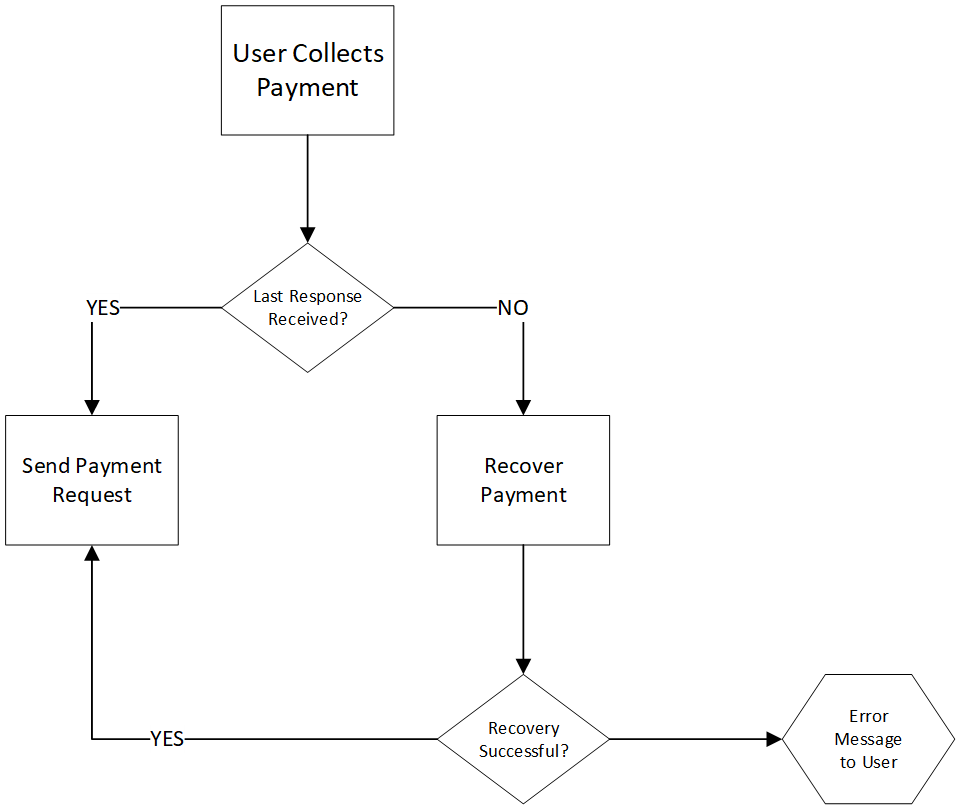 For those cases, mAPI provides a way to retrieve the data associated with that specific payment as detailed below.
- recoverPayment: The payment recovery will ask the terminal for its last message and will verify whether the Payment's requestId and the last message from the terminal are identical. When the messages are identical, it will deliver the receipt of the last transaction which was not completed for some reason. The terminal will no longer require a recovery and could be used again for making new transactions.
ExternalTerminal terminal = ExternalTerminal.newBuilder()
    .ipAddress("127.0.0.1")
    .port(20002)
    .compatibilityPort(20007)
    .socketMode(ExternalTerminal.SocketMode.SINGLE_SOCKET)
    .terminalType(ExternalTerminal.TerminalType.ATTENDED_OPI_DE)
    .languageCode(LanguageCode.EN) // language of the terminal messages (optional)
    .build();

String paymentRequestId; //RequestId of the payment you want to recover

TerminalDelegate terminalDelegate = new TerminalDelegate() {

    @Override
    public void onPaymentAdministrationSuccess(PaymentAdministrationResult result) {
        //contains code which handles a successful ticket reprint
        //The result of the last transaction is embedded in the PaymentAdministrationResult,
        //to get this result you can use the following code:
        (PaymentResult) result.result()
    }

    @Override
    public void onError(Error error) {
        //contains code which handles a failed reprint ticket
    }

    @Override
    public void printMerchantReceiptAndSignature(PaymentReceipt receipt) {
        //contains code which handles receiving a merchant receipt
    }

    @Override
    public void printCustomerReceiptAndSignature(PaymentReceipt receipt) {
        //contains code which handles receiving a customer receipt
    }
};

TerminalApi terminalService = new TerminalService();
terminalService.recoverPayment(externalTerminal, paymentRequestId, terminalDelegate);
Accessing mAPI logs
It’s possible to access/view the protocol specific internal logging of the mAPI.
This is done by registering a MPALogger implementation object to the MPALogging class.
public class AndroidLogger implements MPALogger {
   @Override
   public void log(String line) {
       Log.v("MAPI", line);
   }
}

MPALogging.addLogger(new AndroidLogger());
Receipts
The receipt’s data is returned in the call back functions printMerchantReceiptAndSignature and printCustomerReceiptAndSignature in PaymentDelegate using the PaymentReceipt object.
JSON receipts
If the JSON receipt option is enabled for a terminal, it can be fetched from the first line of PaymentReceipt as per the below example.
@Override
public void printMerchantReceiptAndSignature(PaymentReceipt receipt) {
    log("Print merchant receipt and signature " + receipt.plainTextLines().get(0));
}

@Override
public void printCustomerReceiptAndSignature(PaymentReceipt receipt) {
    log("Print customer receipt and signature " + receipt.plainTextLines().get(0));
}
Text receipts
In case the JSON receipt option is not enabled, the text formatted receipt can be fetched from the PaymentReceipt object.
Reference refunds
This chapter describes how to initiate the full or partial refunds on a specific transaction. The process is equivalent to the normal flow of refunds, but one must pass specific data structure to identify the payment required to be refunded. You can initiate a full or a partial refund by passing the amount of the refund. If the amount is equivalent to the amount that was paid it will be considered as a full refund. Otherwise, a partial refund will be initiated.
The function below gives an example of how to build the refund Payment.class instance.
Please refer to the Javadoc below for a detailed explanation
/**
* getRefund function creates a Payment instance which should be initiated by mAPI
*
* To identify the concrete transaction you must pass .additionalHostData(additionalDataJson)
* value to the Payment builder. The data contains a JSON object which should hold
* a reference number value for the key "refNumber"
* The final JSON should look like:
* { "refNumber": "ref_id_of_transaction" }
*
* @param transactionId Reference number of the transaction
* @param amount: Payment amount to refund, By default "EUR" currency is used which can be modified
* @return Payment.class object which will be passed to the payment flow
*/
public static Payment getRefund(String transactionId, String amount) {
    Money money = new Money(new BigDecimal(amount), Currency.getInstance("EUR"));

    HostAdditionalData additionalData = new HostAdditionalData();
    additionalData.refNumber = Integer.parseInt(transactionId);

    String additionalDataJson = new GsonBuilder().create().toJson(additionalData);

    return Payment.builder()
        .amount(money)
        .type(Payment.Type.REFUND)
        .transactionId(transactionId)
        .additionalHostData(additionalDataJson)
        .amount(money)
        .build();
}

public static class HostAdditionalData{
    @SerializedName("refNumber")
    public int refNumber;
}
Void (reversal)
It is also possible to void a transaction i.e., cancel it. The reversal is possible to be executed only for successful transactions that were not settled.
Void last transaction
To reverse the last payment, the type of the Payment object should be set to VOID as per the below example.
Payment payment = Payment.builder()
    .type(Payment.Type.VOID)
    .build();

PaymentApi paymentService = new PaymentService();
PaymentDelegate paymentDelegate = new PaymentDelegate() {
    ...
};

paymentService.payment(terminal, payment, paymentDelegate);
Void a specific transaction
To reverse any transaction, the transactionId should be specified as well as the type of the transaction as per the below example.
Payment payment = Payment.builder()
    .type(Payment.Type.VOID)
    .transactionId(paymentSTAN)
    .build();

PaymentApi paymentService = new PaymentService();
PaymentDelegate paymentDelegate = new PaymentDelegate() {
    ...
};

paymentService.payment(terminal, payment, paymentDelegate);