Signing Strategy
Every production app under Android needs to be signed.
Additionally, we at Rubean protect the integrity of the app with an app integrity check as mentioned in Software Integrity.
To facilitate multiple security and ease-of-use requirements we offer different key signing strategies.
Currently, we support public RSA keys with a length from 1024-bit to 4096-bit in our integrity check.
SDK customers
For customers that integrate the PhonePOS SDK, we need to obtain the public part of your signing key pair by which your app will be finally signed with.
This public key will be integrated into the build of PhonePOS that you receive and be used by our app integrity check.
Builds without the right key will crash immediately.
APK customers
For customers that integrate the PhonePOS APK, we offer two ways for the delivery of the artifact. You can either choose the classic APK or AAB (Android App bundle). APKs can be installed directly on every phone, AAB is the format that Google requires for the delivery of newly uploaded Play Store apps.
APK delivery
APKs will be built and directly signed with a key pair that is stored in a secure vault on the Rubean side. We will provide you the public key to enable you to upload the build to the Play Store (if needed). Google does request the public key to verify that the content of the app was not changed during the upload to the Play Store.
AAB delivery
In case of the AAB Google offers the so-called Play App Signing option. We recommend to activate this option, however this is not mandatory. The main difference between Play Signing opt-in and opt-out is where the final signing of the delivery happens. In the opt-in case Google will sign the package on a secure Google server. In the opt-out case the signature present during upload is preserved. Google heavily recommends to use Play Signing opt-in.
Play Signing opt-in (recommended)
In this case Google distinguishes between the upload and the app signing key in signing process.
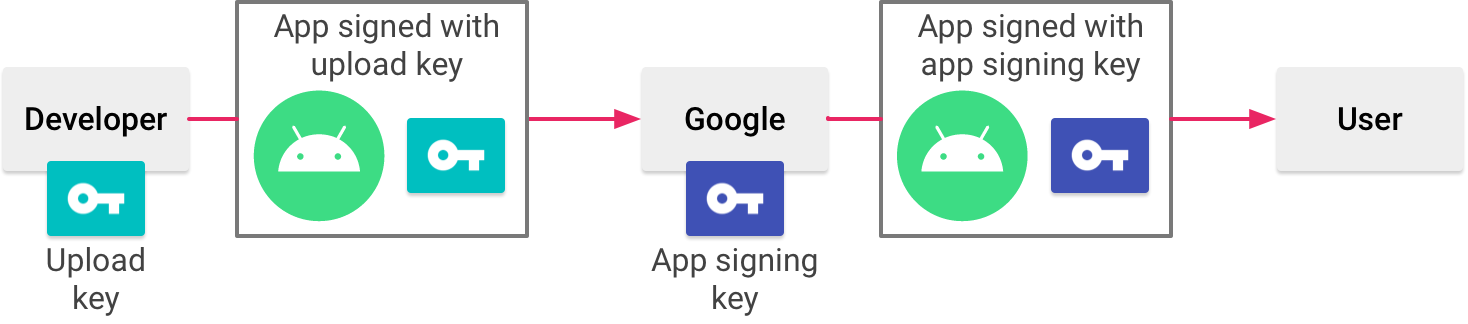
Upload key
The upload key is used for building and uploading the application to the Play Store. We will generate an upload key pair for you and store it in our secure vault. The public key of the key pair will be sent to you and needs to be registered on the Play Console. Google will check with this key if the app is in an untampered state.
Signing key
The app signing key is used by Google to sign and deliver the app to customers. The signing key can either be created by Google itself (recommended) or you can create your own key pair yourself and upload it completely to Google. In both cases the public key of the key pair is required to be integrated into the PhonePOS build for app integrity checks. Google describes how to download the public key in their App-Signing documentation under "Working with API providers".
Play Signing opt-out
In this case the signing process will be similar to the APK delivery. We will create one key pair which will be used for signing the AAB. After the generation of the key pair we will transmit to you the public key. It needs to be uploaded to the Play Store console.