Permissions and Settings
The following permissions are necessary for PhonePOS to function correctly:
- NFC: We use NFC to communicate with cards and other phones to exchange payment information.
- INTERNET: Required for the communication with our servers.
- ACCESS_NETWORK_STATE: We react on the current network state and retry requests when the internet connection is reinstated.
- BLUETOOTH & BLUETOOTH_ADMIN: For our certification we are required to check all connected devices, including Bluetooth devices. This permission is used until Android 11.
- BLUETOOTH_CONNECT: If Android 12 and up is used, this permission is used to check connected Bluetooth devices.
- RECEIVE_BOOT_COMPLETED: When the phone boots up PhonePOS will automatically start up to make payment processing as fast as possible.
- FOREGROUND_SERVICE: We use foreground services to communicate to our backend and to start our terminal.
- FOREGROUND_SERVICE_DATA_SYNC: This service type is used for our monitoring component which reports the current attestation state of the phone.
- FOREGROUND_SERVICE_SPECIAL_USE: This service type is used for our terminal component which processes the sensitive payment data.
- WAKELOCK: For the monitoring process we acquire a PARTIAL_WAKE_LOCK.
- SENSOR_ACCELEROMETER: The accelerometer is used during the startup of our software internally.
- POST_NOTIFICATIONS: Required to provide the overall status of PhonePOS in the form of a notification to the user.
- CAMERA: Used to prevent other apps from accessing the camera during payments, mitigating serious attack vectors:
- Front camera: Prevents attackers from estimating finger movements to capture the PIN (Personal Identification Number).
- Back camera: Prevents attackers from capturing images of the presented card and extracting the PAN (Primary Account Number).
- HIDE_OVERLAY_WINDOWS: On some of our activities we have to suppress overlays to protect the privacy of user data.
- DYNAMIC_RECEIVER_NOT_EXPORTED_PERMISSION: This permission is set in ContextCompat of the AndroidX Core library.
- Allow unrestricted Power / Battery Mode: Ensures the app is not cleared from memory by the operating system, enabling quick payments at all times.
Battery and Custom Settings
PhonePOS requires payment background services to run. Power-related system settings can lead to these services being killed.
To avoid such issues it is advised to exclude PhonePOS from any battery optimization.
Example for Android 14:
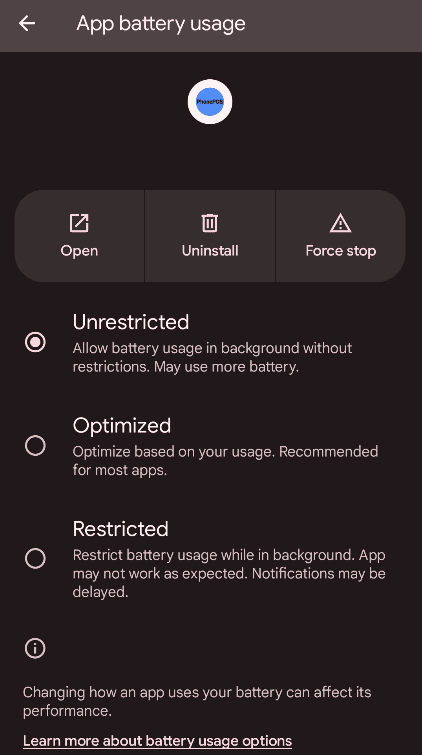
Furthermore, some custom Android modifications by device manufacturers may interfere with reliable operation. This includes the autostart settings of Xiaomi's MIUI Android derivative.
Enable background autostart for PhonePOS under Apps > Permissions > Background autostart:

Unihertz devices have some additional settings under Apply advanced settings > App blocker.
For PhonePOS to work in this case, you must either deactivate the app blocker completely or at least remove all restrictions:

Please verify if there are similar settings on your device and set them accordingly.
It is a good idea to recommend these changes to your users to improve their experience with PhonePOS.
Checklist
You can refer to the following checklist to ensure that a device is set up correctly.
- Permissions are granted
- NFC is turned on
- Device Integrity is at least classified as MEETS_DEVICE_INTEGRITY (see here)
- Network Connection is provided
- Battery optimization excludes PhonePOS
- Autostart is enabled for PhonePOS