Security Guidance
The PhonePOS SDK is delivered as an isolating SDK. This means, that all security relevant information for payments are managed from within the SDK to the Rubean backend. There is no configuration requirement for the integrator to configure special parameters in a secure manner to get the Application on top of the isolating SDK working.
This chapter and applicable supporting procedures are designed to provide Rubean AG and integrators, who integrate the PhonePOS SDK into their applications, with a documented and formalized process for ensuring that:
- Information will be protected against unauthorized access
- Confidentiality in information will be assured
- Integrity of information will be maintained
- Availability of information for business processes will be maintained
- Legislative and regulatory requirements will be met
- Business continuity plans are maintained and tested
- Information security training is available for all employees
- All actual or suspected information security breaches will be reported to the Information Security Manager and thoroughly investigated
This document is intended and directed to Rubean customers and integrators who are using the Rubean platform to add contactless payment acceptance capabilities to their solution or application.
Introduction
PCI Compliance Overview
The Payment Card Industry (PCI) Data Security Standards (DSS) is a global information security standard designed to prevent fraud through increased control of credit card data. Organizations of all sizes must follow PCI DSS standards if they accept payment cards from the five major credit card brands, Visa, MasterCard, American Express, Discover, and the Japan Credit Bureau (JCB). Compliance with PCI DSS is required for any organization that stores, processes, or transmits payment and cardholder data.
PCI-MPOC
The PCI Security Standards Council (PCI SSC) has published a new standard designed to support the evolution of mobile payment acceptance solutions. PCI Mobile Payments on COTS (MPoC) builds on the existing PCI Software-based PIN Entry on COTS (SPoC) and PCI Contactless Payments on COTS (CPoC) Standards which individually address security requirements for solutions that enable merchants to accept cardholder PINs or contactless payments, using a smartphone or other commercial off-the-shelf (COTS) mobile device. The PCI MPoC Standard aims to provide increased flexibility not only in how payments are accepted, but in how COTS-based payment acceptance solutions can be developed, deployed, and maintained.
MPoC Software Version
All MPoC builds use the software version 4.XX and up. MPoC builds use additional mTLS base communication channels to support the MPoC certification.
It is mandatory for SDK Integrators to display the version of PhonePOS visibly in their UI. MPoC mandates this with D.3.1.2:
"All software versions are uniquely identified and tracked throughout the software lifecycle".
A display in the settings or about screen of your app is sufficient. You can query the PhonePOS software version via the SDKInfo() call.
System overview of PhonePOS App and Backend
High Level Conceptual Overview
The PhonePOS SDK and Application contain all necessary components to transform the device into a POS terminal.
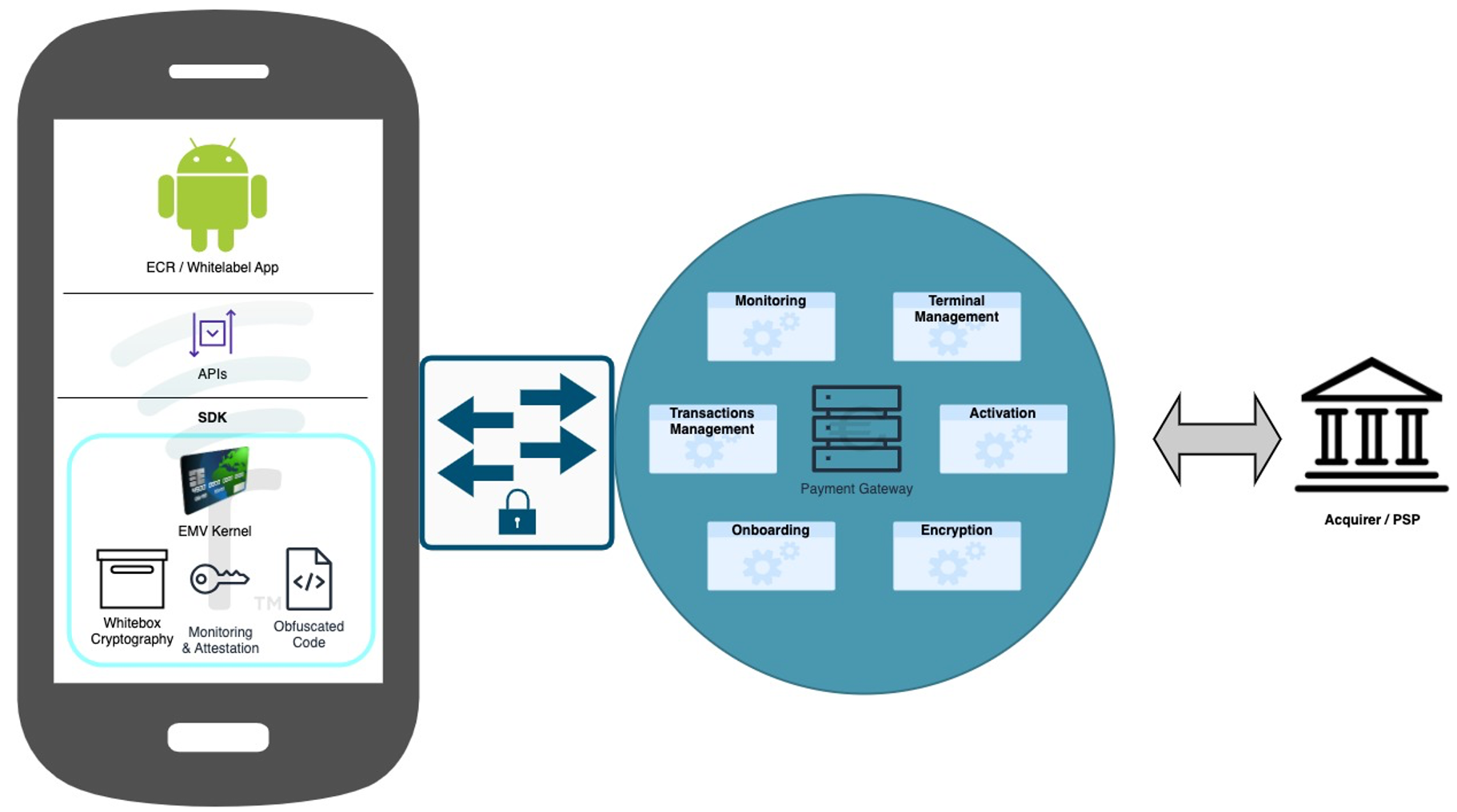
The PhonePOS SDK and Application communicate to the Rubean backend to achieve multiple different objectives:
- Personalize / activate a device on the Rubean payment platform.
- Communicate the health status of a device to the Rubean payment platform (Monitoring).
- Execute a payment on the Rubean payment platform.
High Level Integration Overview
The PhonePOS SDK is delivered as an isolating SDK and can either directly be part of the customer's ECR or other application or can be installed with the Rubean APK,
which is just a very thin APK wrapper around the Rubean isolating SDK.
The following overview shows the two possible implementation models.
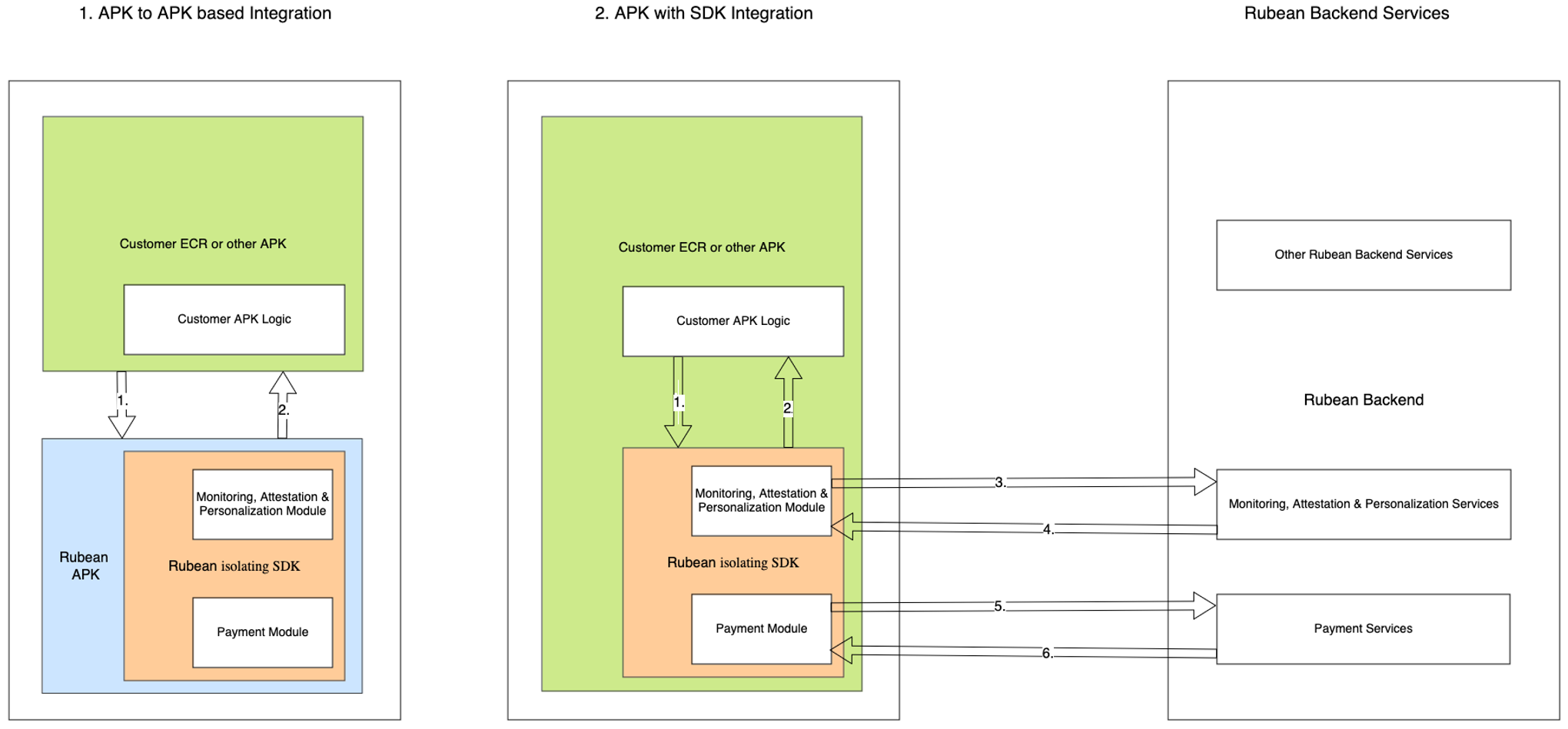
A more detailed diagram can be found below:
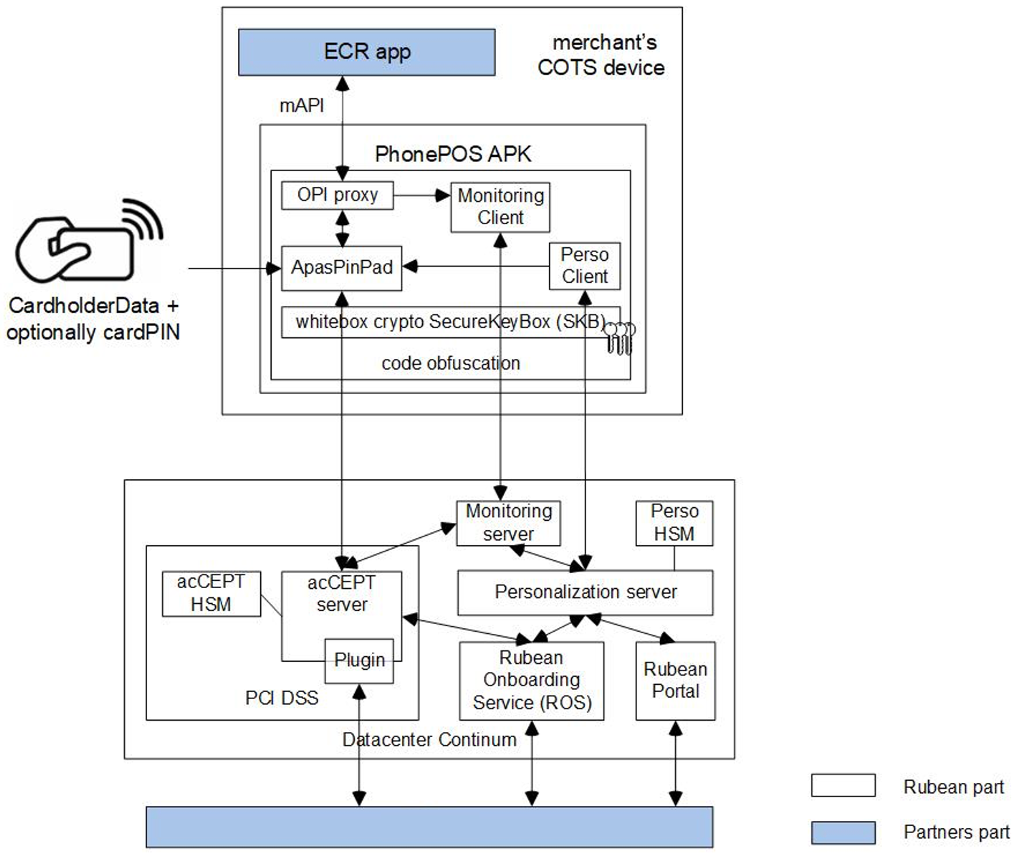
Before a device can be personalised, it needs to be registered on the Rubean backend. This process is called “Onboarding”, as the device is conceptually onboarded onto the Rubean platform. This onboarding is happening on the Rubean backend without any interaction from the mobile device. Enterprises and acquirers connect directly from within their data centers and applications to the Rubean Onboarding Service (ROS). Once a device is onboarded, it can be personalised and activated using the SDK capabilities.
Details of PhonePOS SDK, the Rubean Solution and the SDK Boundaries
SDK Boundaries
The boundaries describe the outline of the PhonePOS SDK solution and the data flow of sensitive data. No sensitive data like PAN or PIN data ever leaves the boundaries unencrypted.
The communication with the Rubean backend is encrypted at least two times with state-of-the-art algorithms.
Payment and cardholder data is considered very sensitive. Any access is forbidden, and PhonePOS takes active measures to prevent any leakage. If the integrating app processes sensitive information, certifications such as MPoC under which PhonePOS was verified no longer apply.
Execution Process and Runtime
To achieve the status of an isolating SDK all processes of PhonePOS are executed in a separate app process. Direct Java calls to components are not possible. All communication is done via Services and as such no access to memory and critical assets is possible. It is strictly forbidden to use the same process as PhonePOS. Not adhering to this invalidates the MPoC isolating SDK certification and means that the integrating app itself falls under the MPoC isolating SDK certification. We recommend not changing the default process of Android for your application.
Accessing The PhonePOS Client Side Artifacts
We describe the process of setting up the SDK artifacts access in the chapter Repository Setup.
APK/AAB deliveries will be communicated to you via mail. SHA-256 Checksums to verify the delivery are available as well.
PhonePOS APIs
You can find all API definitions and how to use them under APIs.
PhonePOS Configuration
The PhonePOS SDK does not offer any security relevant configurations under the MPoC definition from the integrator or the calling ECR.
The security configuration is received entirely from the server. All other configurations are listed in this chapter.
Automatic selection of attestation providers
PhonePOS does automatically detect if the Google Mobile Services (GMS) are present and uses the Play Integrity API as a part of the A&M routine. If GMS are not present an automatic switch to Zimperium zDefend is performed. For this automatic switch to happen the Application ID of the integrating app needs to be known and a zDefend license assigned to it.
Configuration of Terminal Orientation
The PhonePOS app and its included terminal are by default rendered in portrait mode. If rendering in landscape mode is required one can configure the orientation during personalisation and runtime. This configuration is not security relevant. For further details please refer to the chapter Configuration API.
EMV Kernel Configuration
PhonePOS does technically include all supported EMV kernels that Rubean officially supports. The availability of EMV kernels and therefore the acceptance of the various card schemes is entirely configured on the Rubean backend services. During personalisation this information is transferred to the terminal.
Required Backend Paths
The Rubean PhonePOS SDK/APP requires access to the Rubean backend. Please make sure that the following connections are freely available from your network.
PhonePOS 4.X and higher
For PhonePOS 4.X and higher, the following endpoints must be reachable from the mobile device. In the following template please replace the XXXX placeholder with your project name:
- PROD
- QA
SdkConfigurationService: https://sdk-configuration-service-mtls.services.phonepos.online
SecurityProxyServiceMtls: https://security-proxy-service-mtls.XXXX.phonepos.online
SecurityProxyService: https://security-proxy-service.XXXX.phonepos.online
IncidentReportService: https://security-proxy-service-incident-reports.XXXX.phonepos.online
ActivationService: https://activation-service.XXXX.phonepos.online
LandingPage: https://landing-page.service.phonepos.online
LogReportingService: https://glitchtip.phonepos.online

acCEPTServer: 80.72.134.115, Port: 9000 - 9999
acCEPTServerFailover: 217.22.198.121, Port: 9000 - 9999
SdkConfigurationService: https://sdk-configuration-service-mtls.services.qa.rubean.io
SecurityProxyServiceMtls: https://security-proxy-service-mtls.XXXX.qa.rubean.io
SecurityProxyService: https://security-proxy-service.XXXX.qa.rubean.io
IncidentReportService: https://security-proxy-service-incident-reports.XXXX.qa.rubean.io
ActivationService: https://activation-service.XXXX.qa.rubean.io
LandingPage: https://landing-page.service.qa.rubean.io
LogReportingService: https://glitchtip.qa.rubean.io

acCEPTServer: 209.38.183.241, Port: 9000 - 9999
You can easily copy this information by pointing your mouse to the upper right corner of the code box and clicking the copy button.
Please ask your Rubean Support contact if it is not clear which specific platform you want to connect to. Additionally to the connection with Rubean, PhonePOS must execute attestation methods that interact with external providers. By default, the fast and reliable GMS certification is used, however Rubean also offers an attestation method for Android devices that lack GMS certification.
GMS Attestation
If you are using the Google Mobile Services (GMS) attestation provider (Google Play Integrity), you need to gather the required URLs from this Google site. Ensure that the URLs for the following purposes are included:
- Google Play and updates (Important to always keep Play Services up-to-date)
- EMM/Google APIs/Play Store APIs/Android Management APIs
Please note that Google may update the required URLs over time. To verify that Play Integrity requests are executed successfully, you can use the SPIC app. More details about the SPIC app can be found in the Device Integrity – SPIC section.
Zimperium zDefend Attestation
If you are using the Zimperium zDefend attestation provider, please whitelist the following URL wildcard:
*.zimperium.com:443
Asset Overview
In order to use the Rubean platform for accepting payments, the PhonePOS SDK needs to get integrated into the merchant’s App or the merchant’s app needs to talk to the Rubean APK as described in chapter High Level Integration Overview. The communication is identical in both cases. The API definition can be found in the chapter APIs.
In the graph in chapter High Level Integration Overview the following data is communicated through the described arrows. As all security relevant data is handled and managed within the isolating SDK, only generic and non-security relevant information is communicated from the calling APK to the SDK. On the mobile device, the following data is communicated towards and from the PhonePOS SDK:
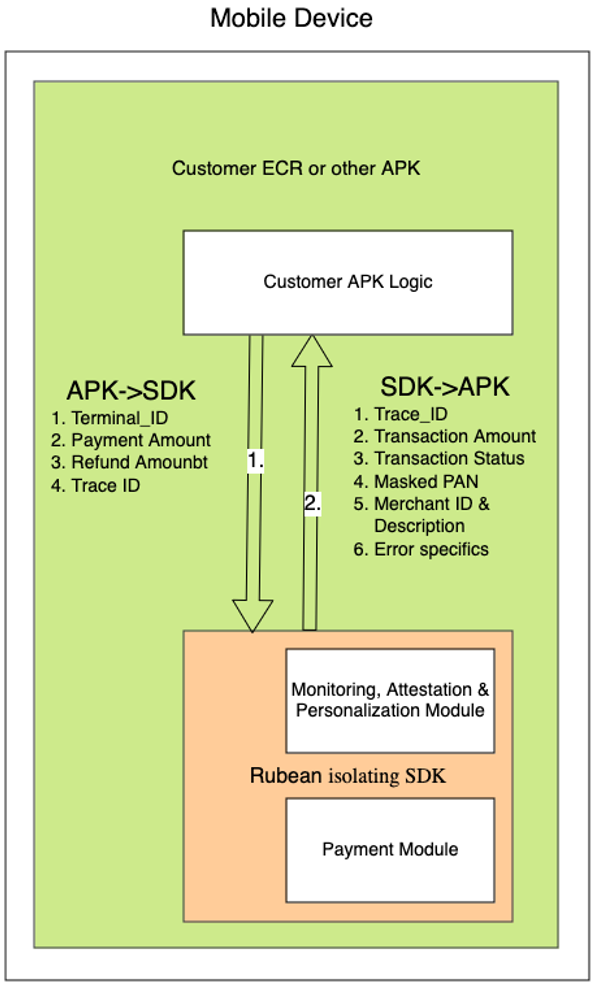
A. Customer ECR or other customer APK communicates with the PhonePOS SDK (either APK to APK – option 1. - or directly to the APK included SDK – option 2. – in figure of High Level Integration Overview via arrow 1 (also detailed in figure directly above):
- Personalization: In order to personalize / activate a device, the dedicated interfaces need to be called once on each device. Depending on the activation method, parameters are handed to the SDK. This is usually only the “Terminal ID”. Note: Just in the case of the automated enrollment, which is only supported in combination with a strongly managed MDM (mobile Device Management System), an additional “Token” is provided via the MDM to the calling APK and then handed down to the PhonePOS SDK.
- Transactions: For transactions, the following parameters are handed over to the PhonePOS SDK:
- Payment: payment amount, optionally additional reference data such as merchant reference and external reference can be provided
- Refund: refund amount, trace number = the transaction ID of the transaction that should get refunded.
Note: a refund always requires a trace ID reference to ensure refunds cannot exceed the amount paid in the initial transaction. - Reversal / Void: trace number = the transaction ID of the transaction that should get reversed / cancelled.
Note: a reversal always requires the reference to the trace ID to ensure the right transaction is reversed/cancelled.
B. The following data is handed back to the calling APK via arrow 2: (in figure of High Level Integration Overview or figure directly above):
- Personalization status: Status of the personalization requests can be Success or failure.
- Transaction result: Feedback on transaction may include (in a JSON receipt):
- Trace ID (transaction ID)
- Amount
- Transaction Status (Success / Failure)
- Masked PAN
- Merchant Description / Merchant ID
- Additional error details in case of non-successful transaction.
C. The PhonePOS SDK communicates with the Rubean backend exclusively through 3 secure channels, which are all mTLS secured. Please see details in the mTLS channel guidance above. All data is additionally payload encrypted. Next to the data from arrow 1, additionally these data fields are communicated through the arrow 3 (in figure of High Level Integration Overview):
- Hardware fingerprint
- Application ID
- Android ID
- Personalization Data
- Monitoring / Health Data / Integrity Status / Connected devices
- PAN & PIN
D. The PhonePOS SDK communicates with the Rubean backend exclusively through 3 secure channels. All data is additionally payload encrypted. Next to the data from arrow 2, additionally these data fields are communicated through the arrow 4 (in figure of High Level Integration Overview):
- Device ID
- Monitoring status
- Transaction result (receipt)
Asset Details
| Asset | Description | Usage | Persisted in SDK on the device | Leaves SDK boundary on the device | Leaves SDK boundary to the backend |
|---|---|---|---|---|---|
| HW_Fingerprint | Computed device HW fingerprint | Input for Device ID generation | No | No | Yes (encrypted) |
| Application ID | Application ID | Input for Device ID generation | No | No | Yes (encrypted) |
| Android ID | Android ID | Input for Device ID generation | No | No | Yes (encrypted) |
| Device_ID | Computed ID of the device on the Rubean platform | Identifying the Device on the Rubean platform | Yes | No | Yes (encrypted) |
| Terminal_ID (TID) | Provided terminal ID from the acquirer / PSP | Identification of the terminal for the acquirer / PSP | Yes | Yes | Yes (encrypted) |
| Personalization data | Data to activate / personalize the device on the Rubean platform | Activate the device on the Rubean platform | No | No | Yes (encrypted) |
| Monitoring / Health data / Integrity data / Connected devices | Set of security relevant data on the device | Verification of device healthiness prior to payments | No | No | Yes (encrypted) |
| Monitoring Status | Health / security state of the device | Precondition for transactions | No | No | Yes (encrypted) |
| Payment amount | Payment amount for transaction | Payment amount for transaction | No | Yes (comes from ECR) | Yes (encrypted) |
| PAN | Primary Account Number | Used to identify the card with the acquirer | No | No | Yes (encrypted) |
| PIN | Personal Identification Number | Used to approve payments above certain limits | No | No | Yes (encrypted) |
| Transaction result / receipt | JSON format of transaction summary (success / error code) with masked PAN | Display the transaction status to the user in the ECR | No | Yes | Yes (encrypted) |
Other Payment SDKs
The integration of another Payment SDK in the ECR is permitted but the total number of Payment SDKs can never exceed the number of two. There can also be no sharing of assets between PhonePOS SDK and another payment SDK.
Security Measures
Secure Device Usage
The mobile device must remain in a secure state. Rooting, ADB debugging, or any methods that compromise security are prohibited. The PhonePOS SDK & APP ensure a secure environment for accepting contactless payments. The processing on devices which do not meet the strict security requirements is halted. Built-in monitoring components verify device, key, and other attestations.
Device attestation includes checks against:
- Google Play Integrity. Replaces Google SafetyNet (wind down end of January 2025)
- Zimperium zDEFEND (for devices without Google Mobile Services)
- Rubean internal attestation measures
- Key attestation verifies hardware-backed key pairs. Additional attestation measures ensure a secure execution environment for transactions.
Attestation and verification are performed automatically before each transaction within the isolated PhonePOS SDK and backend. All communication between the SDK and backend is encrypted.
Provide your app's public signing key and App ID to Rubean. These are critical for preventing unauthorized access to the SDK. If these assets are not provided, not transactions will be possible with the resulting app.
If attestation fails, transactions are rejected. Depending on the failure type:
- Attestation payload does not reach backend: Transaction declined.
- Non-verified App signing key: The app crashes at startup.
- Rooted device: The app crashes and deletes all data.
Device Compatibility
The PhonePOS SDK & APP are designed to run on Google-certified (Google Play Protect Certified) Android devices. A list of supported devices is available here. Additionally, devices under the “Android Enterprise Recommended” program are supported. More details are available here. Devices must also run a supported Android version. Currently, Android 12 and above are supported. PhonePOS can support versions back to Android 8.1 if the manufacturer provides security updates. In special cases of these older Android versions, a special security assessment from a security lab might be required. This is sometimes useful in cases of enterprise APPs on enterprise devices that are managed and protected with and through an MDM (Mobile Device Management System). The Android Key attestation must be available, and NFC capabilities must meet EMV Level 1 strength standards. EMVCO is currently working on an updated EMV Level 1 standard for SoftPOS devices.
Application Security
App Installation and Deployment Requirements
The integrator can either embed the SDK directly into the calling app (typically the ECR) or install the PhonePOS APP alongside the ECR.
Important note: If the isolating SDK is included into another APP, the integrator needs to communicate the APP ID and the public App signing key to Rubean early in the integration project.
The App signing key is “burned” into the PhonePOS SDK and only this one App (with the verified App signing key) can make calls to the Rubean isolating SDK.
The APP ID is verified on the Rubean backend during attestation calls.
Application Distribution Best practices
- Google Play Store: This is the most secure and widely used method to distribute apps. The authenticity of the application is ensured by the Play Store's verification of the app's digital signature and application ID before installation. The Play Signing service, when activated, further secures the process by ensuring that only the properly signed app version is deployed to devices. Please refer to Play Store Distribution
- MDM App store [For enterprise APPs only]: For devices where tighter control is required, using an MDM App store can ensure secure deployment. The MDM must verify the integrity and authenticity of the app package before it is distributed to devices. Detailed information about the MDM application ID and signing key must be communicated to Rubean before deployment. Please refer to Enterprise Distribution
Side-loading is blocked by Rubean’s business logic, so details of the MDM, including the MDM application ID and signing key, must be communicated to Rubean before deployment. Rubean delivers the SDK/APP as a complete, secure package. Newer versions can upgrade existing personalization data, avoiding repersonalization after security updates. Partial patches or updates are not possible.
Independent of the distribution method, the App store that distributes the app package, always needs to verify the signature of the provided package to make sure that the delivery was not modified in transit. The Google Play Store fulfills this requirement.
Mandatory Protection for Distribution Accounts
All accounts with write access to the chosen distribution method (e.g., Google Play Store, MDM) must be secured using robust two-factor authentication (2FA). Two-factor authentication significantly enhances account security, making it much harder for attackers to gain unauthorized access. This protection is essential to prevent malicious actors from compromising distribution accounts and publishing harmful updates, potentially affecting both existing and new customers. Google offers this for their Developer Accounts connected to the Play Store Console right out of the box.
Application Installation Verification
When the Payment Application is installed via the Google Play Store or an MDM, its authenticity is verified in the following ways:
- Unique Application ID: Each app on the Google Play Store has a unique application ID, ensuring that if a user downloads an app with a specific ID, it is authentic. This ID, along with the app signing key, is verified before installation.
- Signature Verification: The app’s digital signature must match the signature associated with the registered app.
- Checksum Verification: Only for MDM deployments, not going through the Google Play Store: For APKs, Rubean also provides SHA-256 checksums which can be verified by the customer/MDM before installing the app.
Post-Installation Verification
Once the Payment Application is installed, the authenticity continues to be verified via the following mechanisms:
- Startup Signature check: During the startup of the PhonePOS app a signature verification is performed. Only well-known signers are accepted, otherwise the app crashes.
- Attestation Verification: During the personalisation of the app we perform an attestation which will check the application ID and the general status of the device. Any app without the whitelisted application ID or a broken security state will be blocked by the backend during attestation calls. The personalisation will not be completed.
Update Verification
Android enforces strict rules regarding app updates. Updates can only be installed if the new app version is signed with the same app signing key as the originally installed version and maintains the same application ID. This ensures that app updates are authenticated and prevents unauthorized or malicious updates.
SDK / APK Validity Check
To verify the integrity of the delivered Rubean software, please use the SHA-256 checksum that you received from Rubean. To gain access to your dedicated checksums, please contact our SDK integration support team at integration support. Additionally, the components are only available through a TLS protected server.
Permission Management
The SDK/APP requires certain permissions from the operating system to function correctly. You can find all permissions that PhonePOS declares under Permissions and Settings.
When you create your ECR, whether it includes the PhonePOS SDK or not, please act from the mindset of least permissions needed. Do not declare permissions that are not strictly needed for the operation of the app.
User Authentication
Personalization Methods
The personalization & activation process assigns a defined TID and computes a specific Device_ID to the individual device in combination with other personalization parameters. The authentication during the personalization process can be achieved through different mechanisms. After the successful finish of the personalization, the device is always identifying itself with the corresponding TID and Device_ID.
-
Confirmation Email Implementation:
- Users receive their credentials (TID & Password) from the acquirer/bank in advance.
- Users authenticate, and the app indicates an email has been sent to them.
- Users click the confirmation link in the email.
- The app finalizes the terminal’s activation and personalization if the click on the confirmation link has been detected.
-
OTP Delivery Implementation:
- Each user has a dedicated TID linked to a phone number or email (set up during onboarding via the ROS service).
- Users do not need to know their TID if the integrator provides it.
- Users request an OTP code, which is sent via the selected method (SMS/Email).
- The OTP code has a short validity period.
- Users enter the OTP code to finalize terminal activation and personalization.
-
Unassisted Enrollment Implementation: (Only through a strongly managed MDM!)
- Terminals are onboarded using a device serial number (not the computed Device_ID, but the MDM-provided serial number, typically used with MDM).
- A token is received in response to the onboarding request (executed by backend).
- The ECR sends the token, TID, and serial number to the SDK.
- The terminal is activated/personalized without further user interaction.
Post-Personalization
Once personalized, the terminal remains in this setup until:
- It is re-onboarded in the administration backend, requiring new personalization.
- It enters a non-secure state, where personalization data and keys are removed, and the app crashes.
Integration
The integrator can either embed the SDK directly into the calling application (usually an ECR) or install the Rubean APP alongside the ECR. The Application ID of the ECR and its public signing key are registered on the backend and compiled into the SDK, ensuring that other apps with different signing keys cannot communicate with the PhonePOS SDK.
Password Policy
The Rubean APP / SDK is protected by the above-mentioned security measures. As the Rubean functions are usually called by an ECR, it is recommended to have a strong authentication to the ECR itself in place. If the method “username and password” is used to authenticate a given user to the ECR, the used password should include ideally all of these measures:
- Password length of at least 12 characters
- Uppercase letters of European languages (A through Z, with diacritic marks, Greek and Cyrillic characters).
- Lowercase letters of European languages (a through z, sharp-s, with diacritic marks, Greek and Cyrillic characters).
- Base 10 digits (0 through 9).
- Non-alphanumeric characters (special characters): '-!"#$%&()*,./:;?@[]^_`{|}~+<=>'
Biometric Authentication
The Rubean APP/SDK is protected by the security measures outlined above. Since Rubean functions are typically called by an ECR, it is recommended to implement strong authentication for the ECR itself.
Modern mobile devices support biometric authentication, which can enhance security. If a user has authenticated at least once with a strong username and password, biometric authentication can be used for additional user authentication.
Authenticity Of Rubean Software
The availability of the Rubean APP/SDK and its updates is communicated through established channels.
Rubean typically provides file checksums to verify the authenticity of the components after downloading them from the Rubean portals.
We also prevent repackaging attacks via our signing key check at the startup of the app.
Transaction Security
Secure Payment Procedures
During the above-mentioned personalization procedure, the relevant keys are provided to the device in a double encrypted way. These keys are stored locally in a SKB (Secure Key Box). Once a payment is initiated, the payment amount is handed to the terminal subsystem of the SDK / APP. This subsystem reads the relevant keys from the SKB and starts a secure mTLS communication with the Rubean payment backend services. The only visible part to the user is the payment amount and the screen, asking the user to tap the card onto the mobile device. Relevant data is securely read via NFC and directly communicated in an encrypted way to the payment servers. The payment servers talk to the hosts of acquirers and payment processors and wait for the transaction result. Sensitive data is never stored in plain text.
Transaction Confirmation
The payment gateway sends the transaction result and a summary in JSON format back to the terminal. The calling ECR can use this data to display the result to the user or generate a summary PDF. The PAN is masked within the JSON receipt.
Data Encryption
Data In-Transit
All data transmitted from the device to the Rubean backend is encrypted. The various key and encryption mechanisms are verified by a security lab but are not detailed here for security reasons.
The used keys are not usable for the implementing ECR. Using, tampering or any other use of the key material is not permitted.
Data At Rest
All sensitive data is encrypted at rest on the device, either within the Trusted Execution Environment (TEE) or the Secure Key Box (SKB). Sensitive data is also encrypted at rest in the backend.
The used keys are not usable for the implementing ECR. Using, tampering or any other use of the key material is not permitted.
mTLS channels
The SDK/APK establishes 3 mTLS encrypted connections (secure channels) to the Rubean payment platform. No additional configuration is required from the integrating app, as these channels are fully managed by Rubean.
-
mTLS connection to Rubean Configuration services:
- A server certificate is hardcoded into the APP/SDK during build time.
- A client certificate and private key are also hardcoded in an encrypted format into the SDK/APK. This allows the configuration service to authenticate the client certificate and verify the legitimacy of the SDK/APK.
-
mTLS connection to Rubean Security Proxy services:
- A server certificate is received through Rubean Configuration services secure channel.
- A client-specific certificate signing request (CSR) is generated using a private key generated and stored with the SDK's Secure Key Box (SKB). This ensures that the Security Proxy can verify individual client certificates, differentiating between legitimate and fake SDK/APK instances.
-
mTLS connection to Rubean payment gateway server (or TLS off-loader):
- A server certificate is hardcoded into the SDK/APK at build time.
- The client TLS private key is generated by the backend's Hardware Security Module (HSM) and communicated to the client through the Rubean Security Proxy services secure channel.
PhonePOS Protection At Compile Time
PhonePOS uses multiple compile time security measures to ensure the highest security during execution.
- Code obfuscation (resilience against reverse engineering)
- Code protection with custom inlined security checks and compile to native (resilience against attacks during runtime)
- Public signing key is added for signing key check (resilience against repackaging attacks)
- Private keys only present in exported SKB format (resilience against reverse engineering)
Bypassing, circumventing, reimplementing or modifying any of these protections is forbidden.
PhonePOS Protection At Runtime
PhonePOS does use multiple runtime security measures to ensure the highest security on execution.
- Execution of code protected native binaries including run time security checks
- Anti Screen recording measures, including detection of Show_taps and Pointer_location options
- Prevention of overlays on payment and especially PIN entry screens
- Root, Frida and other checks that will detect modified devices
- Enforcement of certain patch versions for Android versions
- Several additional runtime protection measures
Bypassing, circumventing, reimplementing or modifying any of these protections is forbidden.
PhonePOS Updates & Patching
The SDK/APP is regularly updated by Rubean, ensuring compatibility with the provided interfaces. Updates fully replace previous versions, which are not patched.
Importance of Timely Updates
- For security reasons, updates are typically provided every three months.
- Updates include refreshed cryptographic material and updated cryptographic function implementation required for transaction communication with the payment backend.
- In case of a critical security issue, Rubean may release an update earlier, depending on the severity of the finding.
- The secure distribution of updates is described in App Installation and Deployment Requirements
Update Notification Procedure
- All integrating customers have access to the software download portal, where the latest versions are always available.
- The Rubean TAM (Technical Account Manager) communicates updates to customers regularly and provides immediate notification for critical updates.
Update Frequency
For security reasons, several symmetric and asymmetric keys are changed at various frequencies. Additionally, some cryptographic components are changed frequently as well. As a result, we recommend using the quarterly (every 90 days / every 13 weeks) updated SDK / APP versions from Rubean.
Therefore, you need to update the application that includes the isolating SDK on a quarterly basis, too. If you use the APK to APK communication, just the PhonePOS APP needs to be updated. Usually, the PhonePOS SDK is not changing any interfaces, exposed on the SDK boundary. If interfaces are changing, it is clearly documented here in the online documentation under APIs.
Patching
The SDK / APP is never patched! Each release is a full new release of the SDK / APK. For security reasons, the SDK / APP is technically even not patchable, as the security measures prevent this. As a result, every change to the installed SDK / APP is always a full SDK / APP Update, replacing earlier versions fully.
Key Management
The isolating PhonePOS SDK, as well as the Rubean app built on top of it, negotiates and communicates all symmetric and asymmetric keys with the Rubean backend services in a secure manner. All keys that are used within the solution are managed entirely by and within the Rubean ecosystem and never leave the Rubean ecosystem. (One known exception: the communication between the Rubean payment gateway and banks, acquirers and PSPs is secured with keys that are known by Rubean as well as the bank / acquirer or PSP). The communication on the device from the calling APK to the Rubean isolating SDK is not encrypted. It is secured by the public signing key verification as mentioned in the High Level Integration Overview. All communication with the Rubean backend is encrypted. Details of this security concept are regularly reviewed by security labs, however not shared here for security reasons. The integrating organization or institution does not need to manage any keys (with the exception of the App signing key) in order to work with the Rubean platform.
Incident Response and Customer Support
Reporting Security Incidents
Security incidents can be reported from many different sources. Usually, the Rubean CISO and CTO are the first people informed in case of a security incident. In case of an actual or suspected information security breach a communication to the Information Security Manager (CISO), which effectively details all relevant information describing the breach, should be opened. If Rubean becomes aware of a customer-relevant security aspect, Rubean proactively contacts customers through the defined email/phone communication channels. Additionally, Rubean might disconnect affected devices from the Rubean platform temporarily to prevent unauthorized actions.
Reporting Channels
Email address: security@rubean.com
Is the right contact path in case of security concerns, questions or incidents. This email distribution list reaches the Rubean management and the CISO.
Phone number: +49 151 25145129
Is available 24 x 7 for urgent security incidents.
Information to include in Reports
Ideally, these aspects are included in an incident report as “Incident Details”:
- Incident Overview: (High level description of the incident)
- Incident Description: (Provide a brief overview of the incident, including how it was detected and the initial impact.)
- Date and Time of Incident: (Date and time when the incident was first detected)
- Incident Type: (e.g., Unauthorized Access, Malware Infection)
- Severity Level: (Low/Medium/High/Critical)
- Incident Status: (Open/Under Investigation/Closed)
- Affected Systems: (List the systems, networks, or applications affected by the incident.)
- Incident Impact: (Describe the impact of the incident.)
Customer Support
The Rubean customer support can be best contacted via email. Alternatively, there is also a telephone connection possible in central European business hours.
Email address: support@rubean.com
Phone number: +49 89 35756 555
We try to handle support requests as quickly as possible. Usually you can either expect a first answer on the same day or a day later (if the request e.g. was created on weekends)
Policies and Procedures at Rubean
Implementing and adhering to organizational policies and procedures is a collaborative effort, requiring a true commitment from all personnel, including management, internal employees and users of system components, along with vendors, contractors, and other relevant third parties. Additionally, by being aware of one’s roles and responsibilities as it pertains to Rubean AG information systems, all relevant parties are helping promote the Confidentiality, Integrity, and Availability (CIA) principles for information security in today’s world of growing cybersecurity challenges.
- Management Commitment: Responsibilities include providing overall direction, guidance, leadership and support for the entire information systems environment, while also assisting other applicable personnel in their day-to-day operations. The CISO is to report to members of senior management on a regular basis regarding all aspects of the organization’s information systems posture.
- Internal Employees and Users: Responsibilities include adhering to the organization’s information security policies, procedures, practices, and not undertaking any measures to alter such standards on any Rubean AG system components. Additionally, end users are to report instances of non-compliance to senior authorities, specifically those by other users. End users – while undertaking day-to-day operations – may also notice issues that could impede the safety and security of Rubean AG system components and are to also report such instances immediately to senior authorities.
- The Information Security Manager (CISO) is responsible for maintaining the policy and providing support and advice during its implementation
Company Policy & Procedure Documents
Rubean has a comprehensive list for policies and procedures that everyone at Rubean needs to regularly comply to. Rubean AG is to ensure that all applicable users adhere to the company policies and procedures and supporting activities listed below. Additionally, the relevant policies and procedures will be fully enforced by Rubean AG to ensure such initiatives are executed in a formal manner and on a consistent basis.
- Undertake all necessary activities for ensuring the Rubean policies and procedures are implemented. This ultimately requires coordination amongst various Rubean AG personnel, along with its suppliers, technology and service providers such as the Cloud provider or code obfuscation technology provider.
- If changes must be made to security relevant policies or procedures, the corresponding policy and procedure documentation needs to be updated and Rubean ensures that all involved personnel understands and acknowledges the updates.
Review of Policies and Operational Procedures
All operational procedures and policies are reviewed at least annually. This includes:
- Procedures to onboard new merchants (Responsible person: Chief Technology Officer at Rubean)
- Procedures, which are located in the data center of our hosting company (Responsible person: Chief Technology Officer at Rubean)
- Business procedures, which interface our customers. Please note our customers are not the merchants, but the acquirers and PSPs who form the interface to the merchants (Responsible person: VP Operation at Rubean)
- Procedures related to the usage of third-party components in Engineering e.g. the WhiteBox Crypto solution (Responsible person: Chief Information Security Officer and Chief Technology Officer at Rubean)
- Procedures related to test coverage and quality (Responsible person: Chief Security Officer and Chief Technology Officer at Rubean)
- Procedures related to security certification and accreditation (Responsible person: Chief Security Officer and Chief Technology Officer at Rubean)
Continuous Security Improvements
Rubean aims to continuously improve the security of the Rubean payment platform and connected devices. Therefore, Rubean is constantly discussing security optimizations within the team and is informing its customers in case of resulting changes to the customer.
Updates to this Document
This document is reviewed and potentially updated for each release. If changes are required, the document is automatically updated and delivered as part of the new release.
Disclosure
Rubean AG reserves the right to change and modify the aforementioned document at any time and to provide notice to all users in a reasonable and acceptable timeframe and format.